Skip to content

Apps & extensions

Same workspace.
Every way you build.

Your projects, approvals and architecture history. At home on your desktop. Right inside your editor.

Cloud tasks need no local model key, Python or WSL.

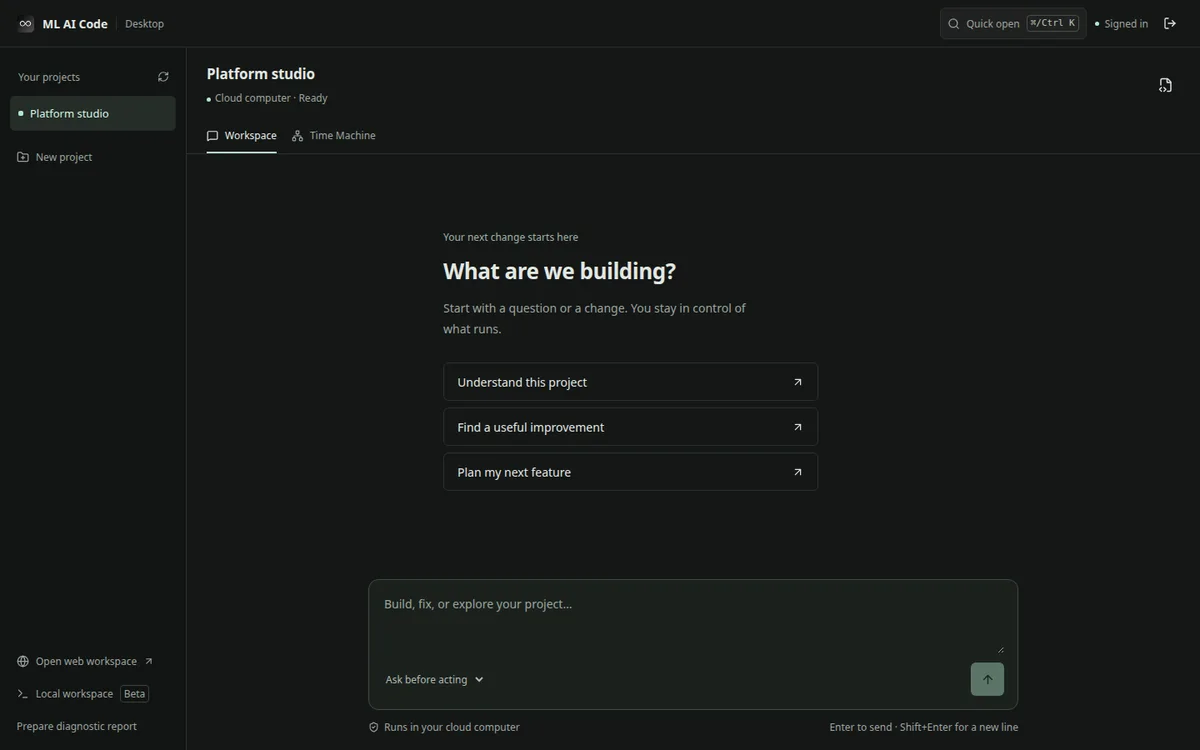
ML AI Code desktop workspace with project navigation, starter prompts and task composer
Desktop interface preview · same interface in your editor

A transparent preview. These desktop packages are not distribution-signed or notarized. They may show OS publisher warnings. Only install if your device policy permits preview software; do not disable your system’s security protections.

01 / A space of your own

Meet your desktop workspace.

Cloud-first. Your local setup can stay exactly as it is.

macOS

Mac

Your coding workspace, without another browser tab. Pick the chip inside your Mac.

Download for Mac

v0.5.1 · 131 MB · Developer preview

Prefer a ZIP? Download the app archive
Install and get started
  1. Open the DMG and drag ML AI Code into Applications.
  2. Open the app and choose Continue with ML AI Code.
  3. Approve the device in your browser. Your cloud projects will appear.

Version 0.4 renames the app from Mini Code to ML AI Code; after updating, delete the old Mini Code app and sign in once more. This preview is ad-hoc signed, not Apple-notarized. If your Mac blocks it, use the web app or your administrator’s approved preview process. Intel packaging is tested; an actual Intel Mac runtime pilot remains pending.

Verify this download

Compare the file’s SHA-256 with:

7964e9eba4f179a8eaa078395aeff1bc97d084017948485a985d7ff90454b0bd

macOS: shasum -a 256 filename
PowerShell: Get-FileHash filename -Algorithm SHA256

Windows x64

Windows

A proper installer and a focused place to build. No WSL is needed for cloud projects.

Architecture 64-bit Intel / AMD
Download for Windows

v0.5.1 · 130 MB · Developer preview

Install and get started
  1. Open the installer and choose your installation folder.
  2. Launch ML AI Code, then Continue with ML AI Code.
  3. Approve the device in your browser to access your projects.

Unsigned developer preview: Windows may show an unknown-publisher warning. Follow your device policy, or use the web app. Local execution is a separate beta and requires WSL2.

Verify this download

Compare the file’s SHA-256 with:

3d1f8f4e95846975e3a95100d448ccac84ef584b9c4a72911b4e75d63698684d

macOS: shasum -a 256 filename
PowerShell: Get-FileHash filename -Algorithm SHA256

02 / Right where you code

Keep your editor. Add your agent.

Review cloud changes before they touch your local files.

VS Code

In your sidebar.

Cloud tasks, approvals and Time Machine beside your code. Native diff review before applying a file.

Download VS Code extension

v0.1.1 · 0.6 MB · Developer preview

Install the extension
  1. Open Extensions in VS Code, then the … menu.
  2. Choose Install from VSIX and select the downloaded file.
  3. Open ML AI Code in the activity bar and sign in.

Requires VS Code 1.95+. Preview updates are announced in the extension; install the newer VSIX the same way. Marketplace publishing is not yet active.

Verify this download

Compare the file’s SHA-256 with:

900cd681bf87ef49afe21a13d5accbd488deaa932b377b3198db4dd5586254e7

macOS: shasum -a 256 filename
PowerShell: Get-FileHash filename -Algorithm SHA256

JetBrains

Inside your IDE.

The same workspace in IntelliJ-based IDEs, with PasswordSafe credentials and reviewed local edits.

Download JetBrains plugin

v0.1.0 · 0.9 MB · Developer preview

Install and enable update checks
  1. Open Settings → Plugins → gear menu → Install Plugin from Disk.
  2. Select the ZIP, restart if requested, then open ML AI Code.
  3. In Plugins → gear menu → Manage Plugin Repositories, add the URL below.
https://mlai-mini-code.vercel.app/updates/jetbrains

Requires platform build 253+ (2025.3) and JCEF for the visual interface. Use the IDE’s normal plugin update controls. Compatibility across IntelliJ IDEA, PyCharm and WebStorm still needs a full runtime pilot.

Verify this download

Compare the file’s SHA-256 with:

a6083de4d8049512f49037881e0e2e8dc672ac6454d4268dd0bf0c0fe591a920

macOS: shasum -a 256 filename
PowerShell: Get-FileHash filename -Algorithm SHA256

03 / Beyond the editor

Terminal, agents and your phone.

Command line

Start tasks, approve work and pull changes into your local repository.

curl -fsSL https://mlai-mini-code.vercel.app/cli/install.sh | sh

Requires Node.js 18+. Then run mlai login. Review the install script before running it. This runs on your own computer; inside a workspace the agent never pipes a download into a shell.

ACP-compatible editors

Use the same cloud agent through the Agent Client Protocol.

Download ACP package
npm install --global "https://g0ngwb3xrtnagcno.public.blob.vercel-storage.com/releases/clients/400238b23934/122e546beb0dc0e22442688134db4c9a18c228be0595a5f5aecc8b7f1ddd6294/ML-AI-Code-acp-any-0.1.0.tgz"

v0.1.0 · Node.js 22+ · Configure your editor to run mlai-acp. Re-run this command to update; registry auto-updates are not active.

On your phone

Keep the web workspace one tap away. Open in Safari or Chrome and choose Add to Home Screen.

Open web workspace

Web features stay current automatically. Native iOS and Android distribution is managed separately.

04 / One release system

Stay current.
Stay in control.

One versioned catalog powers these downloads and client update checks. We can withdraw a release per platform without changing every app.

View release catalog

DesktopAutomatic checks in the new preview. Signed releases can download updates in the background; restart always asks first. Preview updates open this page, never an unverified installer.

VS CodeAutomatic update notifications in the preview. Seamless installation will use the verified Marketplace channel when published. VSIX installs do not silently update themselves.

JetBrainsAdd our repository once to receive updates through your IDE’s normal plugin update controls.

WebNo installer to manage. Reload the workspace to pick up the latest release.

Latest preview

Built to move with you.

Cloud-first clients with Quick Open, project drafts, honest task states, Architecture Time Machine and central update notifications.

Download SHA-256 checksums

Checksums verify downloaded bytes. They do not replace publisher signing or notarization.